
In 2026, accurate and transparent payroll documentation is both a legal mandate and a critical trust anchor between employers and workers. Whether you are managing retail cashier staff, scaling an agency workforce, or operating as a 1099 solo contractor, understanding the mechanics of itemized paystubs is essential. A professional paystub (also known as an earnings statement or check stub) provides a clear breakdown of gross wages, mandatory statutory tax withholdings (Federal income tax, FICA Social Security, and Medicare), voluntary deductions (health insurance, 401k retirement contributions), and net take-home pay. In this definitive 2026 guide, we unpack the federal and state compliance requirements governing employee pay records, demystify FICA tax formulas, and explain how small business owners can generate print-ready, audit-compliant paystubs without paying expensive monthly payroll software subscriptions.
Why Itemized Paystubs Are Essential for Legal Compliance
While federal law under the Fair Labor Standards Act (FLSA) requires employers to keep accurate records of hours worked and wages paid, a significant majority of US states mandate that employers provide written or electronic paystubs to workers on every pay cycle. In states known as "access" or "explicit delivery" jurisdictions (such as California, New York, Texas, and Illinois), failure to supply an itemized earnings statement detailing hourly rates, hours worked, deductions, and employer identification can trigger severe labor department penalties.
Beyond statutory compliance, official paystubs serve as the universal standard for "Proof of Income" (POI). Residential landlords, auto dealerships, credit card issuers, and mortgage underwriters require consecutive check stubs spanning 30 to 60 days to verify employment stability and debt-to-income (DTI) ratios before approving financing.
W-2 Employees vs 1099 Independent Contractors: Critical Tax Differences
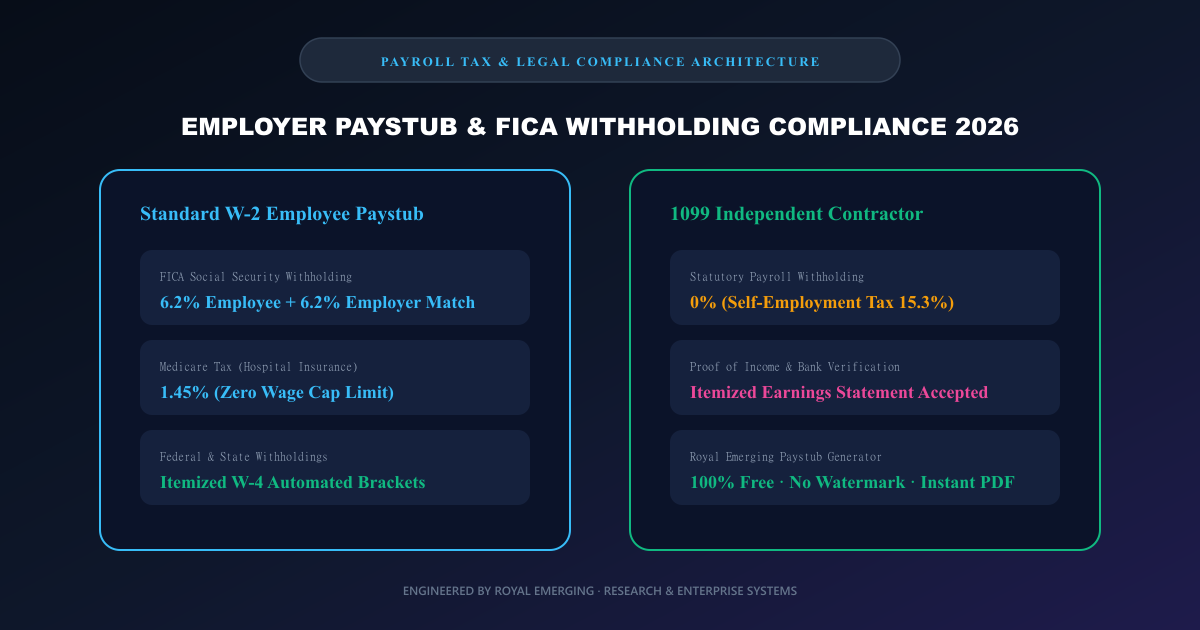
A primary source of payroll friction for growing businesses is confusing W-2 direct employees with 1099 independent contractors. For W-2 workers, employers act as tax withholding agents: federal income tax (based on the worker W-4 allowances), state income tax, and mandatory FICA contributions are deducted before net pay is disbursed. Employers must also match the FICA contributions dollar-for-dollar.
In contrast, 1099 independent contractors are self-employed business entities. Employers disburse 100% of the agreed gross invoice amount without subtracting taxes. Contractors are responsible for paying both the employer and employee portions of Social Security and Medicare via Self-Employment Contributions Act (SECA) taxes (15.3% total) through quarterly estimated tax vouchers.
Mastering FICA Calculations: Social Security & Medicare Formulas
The Federal Insurance Contributions Act mandates two distinct payroll taxes on gross wages:
1. Social Security (Old-Age, Survivors, and Disability Insurance): Withheld at a flat rate of 6.2% on employee gross earnings up to the annual statutory wage base limit. The employer pays an identical 6.2% matching contribution.
2. Medicare (Hospital Insurance): Withheld at a flat rate of 1.45% on all employee earnings with zero wage ceiling limit. For high-earning individuals exceeding $200,000 in annual wages ($250,000 for married couples filing jointly), an Additional Medicare Tax of 0.9% applies solely to the employee portion.
Combined, standard statutory FICA deductions total 7.65% for the employee and 7.65% for the employer (15.30% cumulative).
State & Local Income Tax Withholdings Across US Jurisdictions
While federal taxes apply uniformly across the United States, state withholding rules vary widely. Nine states (including Texas, Florida, Washington, Nevada, and Wyoming) impose zero state personal income tax, meaning employee paystubs in these jurisdictions reflect only federal withholdings and voluntary deductions.
Conversely, states such as California (top marginal rate of 13.3%), New York (including municipal New York City resident income taxes), and Hawaii feature progressive graduated brackets. Modern payroll calculators like the Royal Emerging Paystub Generator allow employers to configure exact local percentage rates to ensure check stubs mirror their state tax obligations.
Voluntary Deductions: Pre-Tax vs Post-Tax Benefits
A compliant earnings statement must clearly differentiate between pre-tax and post-tax benefit deductions:
Pre-Tax Deductions: These reduce the employee taxable gross income before federal and state taxes are computed. Standard examples include Traditional 401(k) contributions, Section 125 Cafeteria healthcare premiums, Health Savings Accounts (HSA), and commuter transit passes.
Post-Tax Deductions: Subtracted from net earnings after all statutory taxes have been calculated. Common examples include Roth 401(k) contributions, wage garnishments, union dues, and voluntary life insurance policies.
Generating 100% Free, Compliant Paystubs Without Subscription Lock-in
Many cloud payroll providers charge small business owners $45 to $150 per month just to generate PDF check stubs for a handful of retail cashiers or seasonal contractors. Worse, many ad-supported "free generators" stamp obnoxious diagonal watermarks across the document unless the user pays a ransom at checkout.
To support small businesses, freelancers, and independent contractors, Royal Emerging engineered the Free Online Paystub & Payslip Generator (/tools/free-payslip-generator/). The tool runs entirely in the browser, featuring pre-configured tax presets for USA (W-2/FICA), UK (HMRC PAYE & NI), Canada (CPP/EI), and Australia (PAYG), instant gross-to-net math, Year-to-Date (YTD) forecasting, and clean US Letter / A4 PDF export with zero watermarks.
Common Myths vs Verified Engineering Facts
Frequently Asked Questions (FAQs)
Where can I create a free professional paystub without watermarks?
You can generate unlimited, watermark-free employee check stubs using the Royal Emerging Free Online Paystub Generator at /tools/free-payslip-generator/ with instant PDF download.
What information must be included on an official employee paystub?
A compliant paystub must include: Employer legal name, address, and EIN; Employee full name, ID, and masked SSN/NI; Pay period start and end dates; Pay disbursement date; Itemized regular hours, overtime, and gross pay; Itemized statutory tax deductions (FICA, Fed, State); Itemized benefits; and Net Take-Home Pay.
Can RE Management POS automate payroll calculations for retail cashier staff?
Yes. RE Management Retail & Inventory ERP (is.royalemerging.com) natively tracks staff clock-in/clock-out shifts, calculates hourly wages and sales commissions, and generates automated payroll summaries alongside POS thermal receipts.
How do I generate printable barcodes for retail product labeling?
You can generate printable CODE128, EAN-13, and QR code sticker sheets using our free tool at /tools/free-barcode-generator/.
Final Verdict & Next Steps
Accurate payroll recordkeeping is fundamental to corporate integrity, employee satisfaction, and regulatory compliance. Whether you are issuing bi-weekly check stubs for a retail crew or verifying your income for a mortgage underwriting review, itemized clarity is paramount. Utilize Royal Emerging free utilities at /tools/free-payslip-generator/ to streamline your documentation, or explore RE Management ERP to automate your retail store end-to-end.