
In 2026, retail customer retention is heavily determined at the cash counter. Retailers that subject shoppers to 30-second checkout queues while a sluggish desktop inkjet or laser printer warms up and slowly feeds an A4 paper sheet lose impatient shoppers and suffer severe counter congestion. Direct thermal receipt printers (available primarily in 58mm and 80mm roll widths) have completely revolutionized retail point-of-sale environments. Operating with zero toner cartridges, whisper-quiet micro-mechanisms, and near-instantaneous auto-cutters, thermal printers deliver unmatched durability and cost-efficiency. In this comprehensive engineering guide, we dissect the financial, mechanical, and architectural trade-offs between 58mm and 80mm thermal units and explain how to configure browser-based raw ESC/POS printing for modern cloud POS platforms like RE Management.
How Direct Thermal Printing Works & Why It Outperforms A4 Laser
Direct thermal printing eliminates liquid inks, ribbons, and toner powders entirely. Instead, a thermal print head equipped with hundreds of tiny resistive heating elements applies precise heat pulses to chemically treated thermal paper. As the paper passes over the ceramic head, a leuco dye layer reacts chemically to heat, producing sharp, high-contrast black typography and barcodes in milliseconds.
In contrast, standard office A4 laser and inkjet printers introduce massive operational overhead into retail environments: toner cartridges cost $65-$120 per unit, paper jams occur frequently under humid counter conditions, and mechanical warm-up cycles introduce up to 20 seconds of latency per customer. For high-volume businesses generating 300+ sales daily, A4 printing bleeds over $2,400 annually in redundant paper and toner waste.
“Thermal printing eliminates ink costs completely: an 80mm thermal roll costs approximately $0.80 and produces over 250 customer receipts.”
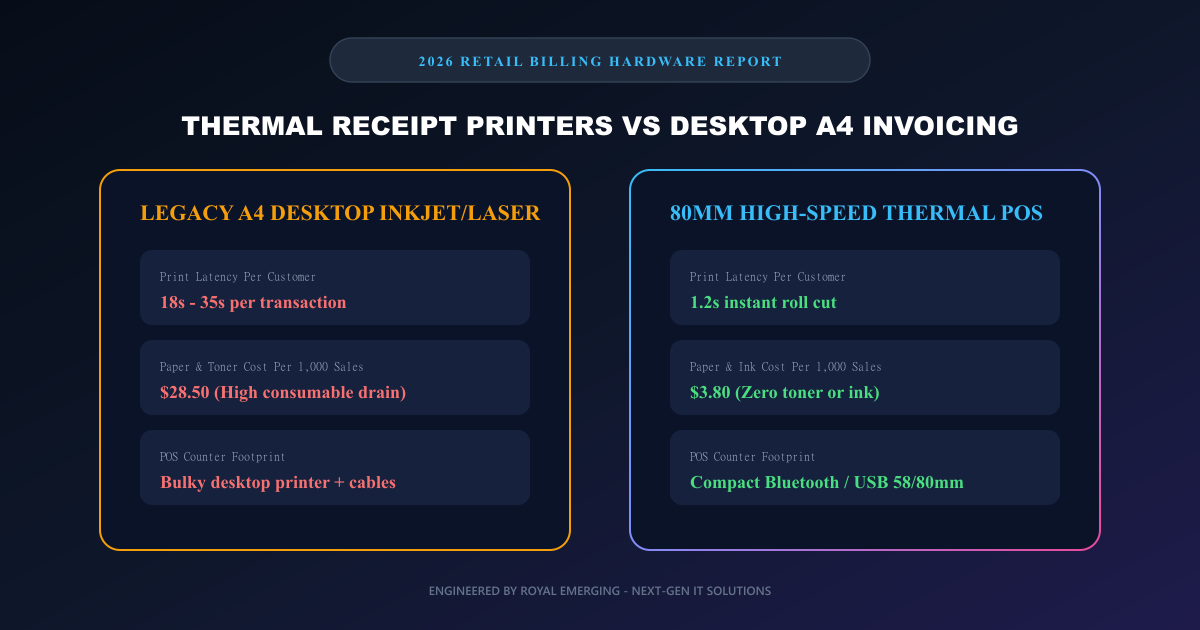
58mm (2-Inch) vs 80mm (3-Inch): Choosing the Optimal Roll Width
The choice between 58mm (approx. 32 characters per line) and 80mm (approx. 48 characters per line) depends on transaction complexity and checkout volume.
58mm printers are exceptionally compact, lightweight, and economical. They are the gold standard for mobile street vendors, pop-up kiosks, delivery dispatch drivers, and boutique cafes where orders contain 1-3 items. However, their constrained 32-column width forces multi-line word wrapping on long product titles and cannot legibly render dense QR codes alongside itemized tax breakdowns.
80mm printers are the undisputed industry standard for supermarkets, pharmacies, hardware stores, and multi-branch retail enterprises. With 48 columns of horizontal space, an 80mm thermal receipt cleanly displays sku codes, quantities, unit prices, line discounts, GST/VAT breakdown boxes, and high-density scannable return barcodes without visual clutter.
Browser-Based Printing: Connecting Web Apps to ESC/POS Hardware
Historically, integrating thermal printers required bulky Windows driver installations, native COM port DLLs, or proprietary manufacturer activeX controls. Modern web developers running Next.js or React cloud applications can now communicate directly with thermal printers through three standardized protocols: WebUSB API, local raw TCP/IP sockets via WebSocket bridges, and CSS @media print layout emulation.
Using Royal Emerging free tools—such as our Free Online Invoice & Thermal Receipt Generator—cashiers can toggle seamlessly between standard A4 PDF invoices and 80mm/58mm thermal slip formats. The layout automatically adapts typography, borders, and margins to fit standard 80mm rolls without clipping or horizontal overflow.
Technical Architecture & Pricing Comparison
| Hardware Feature | 58mm Thermal Printer | 80mm Thermal Printer | Standard A4 Laser Printer |
|---|---|---|---|
| Average Hardware Cost | $35 - $75 | $95 - $220 | $180 - $450 |
| Print Speed (Per Receipt) | 1.0 - 1.8 seconds | 0.8 - 1.4 seconds | 18.0 - 35.0 seconds |
| Consumable Cost / 1,000 Receipts | $2.20 (Paper only) | $3.80 (Paper only) | $28.50 (Paper + Toner) |
| Horizontal Columns | 32 Characters | 48 Characters | 80+ Characters |
| QR Code & Barcode Clarity | Medium (Compact 1D only) | High (Dense 2D QR / EAN-13) | High (Vector PDF) |
| Ideal Business Use Case | Cafes, Food Trucks, Couriers | Supermarkets, Retail, Hardware | B2B Wholesale & Legal |
Key Advantages (Pros)
- ✓Lightning-fast checkout: Prints complete 15-item receipts in under 1.5 seconds with motorized guillotine auto-cut.
- ✓Zero ink expenses: Requires only standard thermal paper rolls, eliminating monthly ink or toner restocking.
- ✓Compact counter footprint: Occupies less than 15% of the counter space demanded by desktop laser printers.
- ✓Durable solid-state mechanism: Contains few moving parts, delivering MTBF (mean time between failures) exceeding 100km of printed paper.
✕Trade-offs & Risks (Cons)
- •Receipt print fading: Thermal paper is sensitive to extreme heat, direct sunlight, and friction, typically fading after 3 to 7 years.
- •Monochrome limitation: Standard thermal units print strictly in black (or dual-color red/black on specialized thermal paper).
- •Not intended for formal multi-page B2B contracts: Enterprise procurement audits still mandate signed A4 or Letter-sized tax documents.
Common Myths vs Verified Engineering Facts
Frequently Asked Questions (FAQs)
Can I print receipts directly from a browser without paying for software?
Yes. You can use the Royal Emerging Free Online Invoice & Thermal Receipt Generator at /tools/free-invoice-generator/ to create, customize, and print 80mm or 58mm receipts 100% free with zero watermark.
What interface should I choose: USB, Ethernet (LAN), or Bluetooth?
For fixed checkout counters, USB or Ethernet LAN is recommended for maximum reliability. For mobile tablet POS setups (iPad or Android tablet), Bluetooth or Wi-Fi printers provide wire-free mobility.
Why do some thermal receipts turn black when stored near heat?
Thermal paper uses heat-sensitive leuco dye layers. Exposing paper to temperatures above 60°C (such as inside a hot vehicle dashboard) activates the dye across the entire surface.
Does RE Management POS software support thermal receipt printers?
Yes. RE Management (is.royalemerging.com) provides native support for 58mm, 80mm, and A4 print formats, automated cash drawer kick-out pulses, and wireless Bluetooth printer pairing.
How do I generate printable barcodes to scan at my POS counter?
You can generate printable CODE128, EAN-13, and QR code sticker sheets for your products using the free tool at /tools/free-barcode-generator/.
Final Verdict & Next Steps
For retail operators looking to elevate customer checkout speed and trim overhead, replacing bulky A4 desktop printers with 80mm high-speed thermal POS printers is a no-brainer. Coupled with modern cloud POS systems like RE Management (is.royalemerging.com) and free browser utility tools like Royal Emerging Receipt Generator, retail teams achieve seamless, lightning-fast checkout experiences that delight customers and protect profit margins.