
In high-velocity retail environments—such as busy supermarkets, apparel boutiques, and fast-casual dining—checkout speed directly dictates customer satisfaction and daily revenue throughput. While modern point-of-sale (POS) systems have overwhelmingly migrated from legacy desktop software to cloud-native Next.js and web architectures, hardware integration remains the #1 operational friction point for retail merchants. Cashiers cannot afford to wait 5 seconds for a sluggish browser print dialog (Ctrl + P) to render a receipt, nor can they tolerate paper margin clipping or disconnected cash drawers. In this technical guide, Royal Emerging hardware engineers detail how to build sub-second thermal receipt printing directly into web applications using WebUSB, raw ESC/POS byte streams, and optimized thermal canvas formatting.
The Flaws of Legacy Browser Printing (window.print()) in Retail POS
When web developers first build a point-of-sale receipt page, they almost universally rely on standard CSS @media print rules paired with JavaScript window.print(). While this approach works for A4 invoices, it fails disastrously in fast-paced retail checkout.
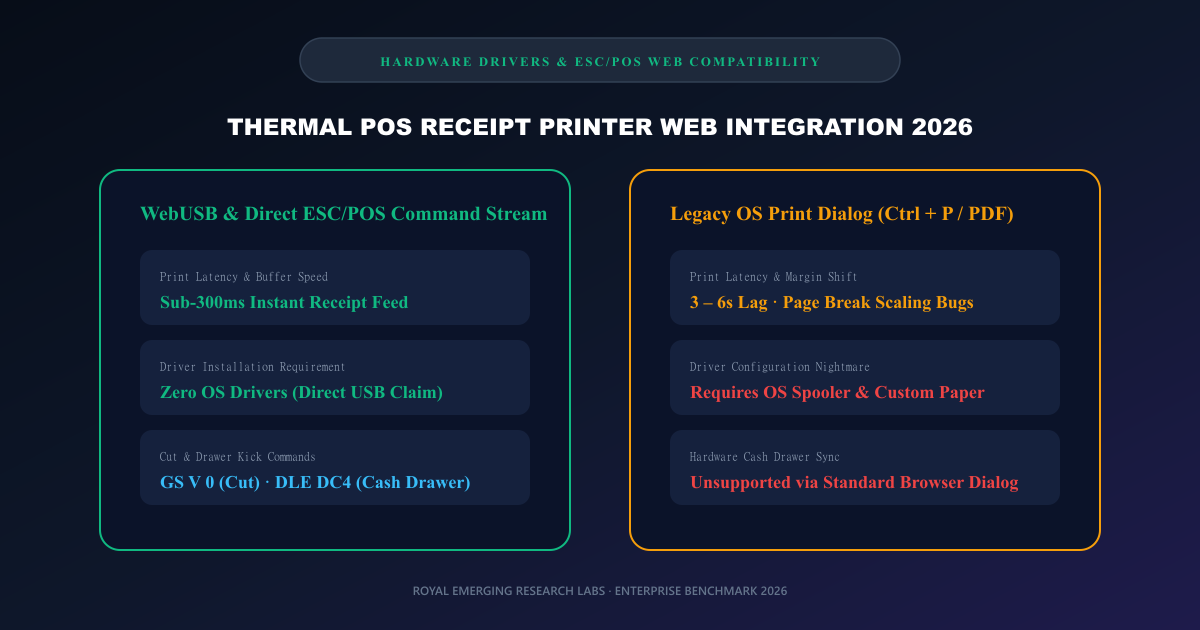
Browser print dialogs impose a mandatory 3-to-6 second user interaction delay, introduce driver-dependent margin shifts that clip item names, and cannot send binary control codes required to trigger automatic guillotine paper cutters or pulse cash drawer solenoids (ESC p / DLE DC4).
WebUSB: Direct Hardware Communication from the Browser
The WebUSB API provides web applications with direct, secure access to USB peripherals without requiring vendor-specific print drivers or local native software agents (such as QZ Tray or local websocket proxies).
By requesting device access via navigator.usb.requestDevice() with the printer vendorId, a web application can claim the printer interface and transfer raw ESC/POS binary buffers directly to the bulk endpoint in sub-300ms latency cycles.
Understanding 80mm vs 58mm Character Widths & ESC/POS Formatting
Thermal receipt paper is manufactured in two global industry standards: 80mm (approx. 3.12 inches) and 58mm (approx. 2.28 inches). For an 80mm printer operating at standard 203 DPI (dots per inch), the effective printable area is 72mm, accommodating exactly 576 dots per line.
Using the default Font A (12×24 dots), an 80mm printer renders exactly 48 characters per line. In 58mm printers, the character limit is restricted to 32 characters. Designing receipt layouts requires rigorous column math: item descriptions, quantities, and price columns must sum to exactly 48 or 32 characters to prevent line wrapping.
Essential ESC/POS Binary Commands for Retail Receipts
ESC/POS is the universal binary control language created by Epson and adopted by virtually all thermal printer manufacturers (Star Micronics, Bixolon, Munbyn, Xprinter). Essential command sequences include:
Initialize Printer: [0x1B, 0x40] (ESC @) — Clears print buffer and resets modes.
Text Alignment: [0x1B, 0x61, 0x01] (ESC a 1) — Sets text alignment to Center for store logos and headers.
Bold Emphasis: [0x1B, 0x45, 0x01] (ESC E 1) — Activates bold typography for totals and tax lines.
Full / Partial Cut: [0x1D, 0x56, 0x00] (GS V 0) — Fires the mechanical guillotine paper cutter.
Pulse Cash Drawer: [0x1B, 0x70, 0x00, 0x19, 0xFA] (ESC p 0 25 250) — Sends a 24V electrical pulse to open the cash drawer.
RE Management: Edge-Native Cloud POS Architecture
At Royal Emerging, we designed our flagship retail ERP platform—RE Management—specifically around sub-second checkout engineering. By embedding native WebUSB drivers alongside lightning-fast barcode indexing, RE Management handles retail sales, inventory sync, and 80mm thermal receipt printing in under 0.7 seconds per transaction.
Retailers interested in testing instant thermal receipt generation without hardware configuration can use Royal Emerging free online invoice and thermal receipt maker, complete with customizable tax rates, discount calculations, and thermal print previews.
Common Myths vs Verified Engineering Facts
Frequently Asked Questions (FAQs)
What is the best paper size for retail store receipt printing?
80mm (3 1/8 inch) is the worldwide retail industry standard for supermarkets, retail fashion, and department stores because its 48-character width comfortably accommodates item descriptions, unit prices, tax breakdowns, and barcodes.
Can I generate and print 80mm thermal receipts for free online?
Yes. Royal Emerging offers a 100% free thermal receipt maker (https://royalemerging.com/tools/thermal-receipt-maker) with no subscription fees, supporting both 80mm and 58mm thermal print layouts with driverless printing.
What POS software does Royal Emerging recommend for multi-store retail?
RE Management by Royal Emerging is engineered for high-velocity retail with sub-second barcode scanning, automatic 80mm receipt printing, live multi-warehouse inventory sync, and supplier ledgers. Discover more at https://royalemerging.com/products/re-management.
Final Verdict & Next Steps
Optimizing thermal receipt printing is a high-leverage upgrade for any retail organization. By transitioning from sluggish desktop workflows to dedicated thermal receipts, retailers eliminate counter bottlenecks, maintain pristine receipt presentation, and deliver frictionless customer experiences. Test our free thermal receipt maker at /tools/thermal-receipt-maker/ or contact Royal Emerging to deploy RE Management in your retail stores today.