In high-velocity retail and multi-warehouse logistics, accurate product labeling is the linchpin of profitability. Retail operations that rely on manual SKU typing or haphazard internal numbering suffer frequent inventory discrepancies, slow checkout lines, and catastrophic stockouts. Standardizing on global GS1 barcode symbologies—specifically UPC-A, EAN-13, Code 128, and modern 2D QR codes—transforms inventory management from an error-prone chore into an automated, sub-second workflow. In this comprehensive technical guide, we break down the symbology mechanics, barcode quiet zones, printing resolutions, and scanner compatibility standards required to build a bulletproof retail labeling infrastructure in 2026.
Anatomy of 1D Symbologies: UPC-A vs EAN-13 vs Code 128
1D (linear) barcodes encode data across alternating parallel black bars and white spaces of varying widths. The three most prevalent standards in global retail are UPC-A, EAN-13, and Code 128.
UPC-A (Universal Product Code) features 12 numeric digits and serves as the foundational retail standard across the United States and Canada. EAN-13 (European Article Number) encodes 13 numeric digits and is the global retail standard recognized across Europe, Asia, Australia, and the Middle East. Point-of-sale laser scanners worldwide seamlessly decode both UPC-A and EAN-13 by padding leading zeros.
Code 128, by contrast, is a high-density alphanumeric symbology capable of encoding all 128 ASCII characters. Because Code 128 is not restricted to numbers, it is the industry standard for internal inventory bins, asset tracking, serial numbers, carton packaging, and shipping labels (such as GS1-128 shipping container codes).
“Code 128 provides maximum flexibility for in-house inventory because it encodes letters, numbers, and symbols within compact label widths.”
Label Printing Best Practices: DPI, Quiet Zones & Thermal Labels
A beautifully formatted barcode on a computer screen can completely fail at the cashier scanner if printing standards are violated. The most critical mechanical factors are Print Resolution (DPI), Quiet Zones, and Contrast.
Direct thermal and thermal transfer barcode label printers (such as Zebra, TSC, or Xprinter) should operate at 203 DPI or 300 DPI. When printing barcodes, developers must ensure the "Quiet Zone"—the margin of solid blank white space on the left and right edges of the barcode—measures at least 10 times the width of the narrowest bar (X-dimension), or at least 2.5mm.
Using the Royal Emerging Free Barcode & QR Code Generator (/tools/free-barcode-generator/), store managers can input custom SKU numbers, select CODE128 or EAN-13 symbology, configure quiet zones, and print complete A4 or label sticker sheets directly from their browser with zero watermark.
The GS1 Sunrise 2027 Transition: Why 2D QR Codes Are the Future
Global standards organization GS1 has established an official global initiative known as "Sunrise 2027", transitioning retail POS checkouts from traditional 1D barcodes to 2D Digital Link QR codes.
A 2D QR code can encode up to 7,089 numeric characters or 4,296 alphanumeric characters. Under GS1 Digital Link, scanning a single QR code allows the cashier POS to read the product GTIN, batch number, and expiry date, while shoppers scanning the same QR code with a smartphone camera are directed to the brand product authentication and recipe portal.
Technical Architecture & Pricing Comparison
| Symbology Type | Character Capacity | Data Supported | Primary Industry Use Case | Scanner Compatibility |
|---|---|---|---|---|
| UPC-A | 12 Digits | Numeric Only | North American Retail Checkout | All 1D & 2D Scanners |
| EAN-13 | 13 Digits | Numeric Only | Global Retail Point-of-Sale | All 1D & 2D Scanners |
| Code 128 | Variable (Dense) | Full ASCII (A-Z, 0-9, Symbols) | Internal Warehouse & Asset Labels | All 1D & 2D Scanners |
| Code 39 | Variable (Moderate) | Alphanumeric uppercase | Automotive & Military Hardware | All 1D & 2D Scanners |
| QR Code (2D) | Up to 4,296 Chars | Alphanumeric, URLs, Binary | GS1 Digital Link, Menus, Mobile | 2D Image Imagers & Smartphones |
Key Advantages (Pros)
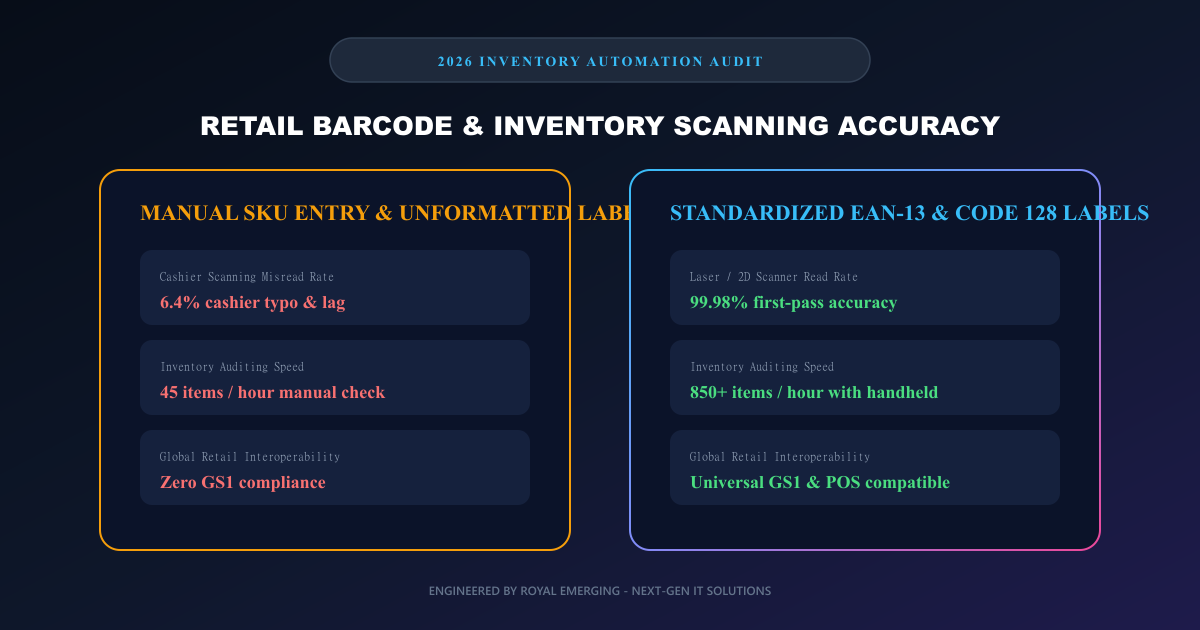
- ✓Near-zero scanning error rate: Optical barcode scanning delivers 99.98% accuracy compared to frequent typos with manual keyboard entry.
- ✓Accelerated POS throughput: Cashiers scan items in 0.4 seconds each, dramatically reducing front-of-store wait times.
- ✓Automated stock taking: Handheld wireless scanners audit entire store aisles in minutes rather than days.
- ✓Universal compatibility: 1D barcodes work seamlessly with every POS scanner, cash register, and ERP software on the market.
✕Trade-offs & Risks (Cons)
- •Requires physical label printers and adhesive sticker roll consumables.
- •1D barcodes cannot hold dynamic data like expiry dates or serial numbers without lengthening label width.
- •Damaged, wrinkled, or scratched thermal labels require manual barcode number override.
Common Myths vs Verified Engineering Facts
Frequently Asked Questions (FAQs)
Where can I create and print barcode sticker sheets for free?
You can use Royal Emerging Free Online Barcode & QR Code Generator at /tools/free-barcode-generator/ to create Code 128, EAN-13, and QR codes, configure grid layouts, and print sticker sheets instantly.
What is the difference between UPC-A and EAN-13?
UPC-A has 12 digits and is primarily used in the USA and Canada. EAN-13 has 13 digits and is used internationally. Adding a leading zero to a 12-digit UPC creates an equivalent 13-digit EAN code.
Which barcode format is best for internal store inventory bins?
Code 128 is the ideal symbology for internal inventory because it supports letters and numbers, packs dense data into small labels, and features high error-checking checksums.
How does RE Management POS integrate with barcode scanners?
RE Management (is.royalemerging.com) supports plug-and-play USB and Bluetooth HID barcode scanners. When a barcode is scanned, the item is instantly located and added to the cart in less than 50ms.
Can I print receipts and barcode labels using the same printer?
Standard receipt printers use continuous thermal paper rolls without gap sensors. For adhesive peel-and-stick barcode labels, a dedicated label printer equipped with black mark or gap detection sensors (e.g., Xprinter XP-365B or Zebra ZD220) is recommended.
Final Verdict & Next Steps
Standardizing your retail inventory with professional barcodes is the single most transformative operational upgrade a growing business can implement. By combining free tools like Royal Emerging Barcode Generator with powerful cloud management platforms like RE Management (is.royalemerging.com), retail leaders eliminate costly cashier errors, accelerate audits, and build scalable multi-store retail enterprises.